
A guard who does not show up, or who walks in late, is the call every security company hates. The client is already angry. The roster was never confirmed. Someone called out an hour ago and the message is still in a group chat. The post is empty, and the contract has a penalty clause for that.
Security guard scheduling software is meant to break that chain. A calendar full of names is not a schedule if nobody has agreed to work it, nobody is watching the start of the shift, and the office hears about it from the client. CrewHub is in one section at the end.
The week falls apart in ordinary ways
Someone builds the roster on Friday and pastes it into a chat. Two guards reply. Three say nothing. One might swap Saturday. On Monday a supervisor changes a site time and tells the guard who happens to be in the office. Everyone else still has Friday's version.
Then a call-out arrives as a text to a manager who is driving. The manager asks the group who can cover. Three people answer. Two are already on another site. The third heads in, but nobody writes it down, so a second person also leaves home. You pay someone to turn around, and the client still waited.
Silence is the quiet version. The guard assumes the shift was cancelled. You assume silence means yes. A late start is the same story with a shorter delay: the guard is still on the way, the client is at the door, and you hear it from the client, so the apology is already late. If the contract has a penalty clause, that morning becomes a bill. Even without one, the next renewal starts there.
What a missed shift costs you
The cost shows up in the same places every week.
A supervisor spends the morning on the phone instead of running the sites. Cover is grabbed in a rush, so you get whoever saw the message, not always the person who knows the site. The only guard who can still arrive in time may already be near the end of their hours. Someone else is sent to the wrong address because two rosters are going around.
Later, payroll argues with the timesheet. The guard says they were there. The client says the post was late. With no clock-in tied to the site, it is memory against memory. The invoice waits on the same argument, because you should not bill hours you cannot stand behind.
One missed shift becomes a story the client retells. A second one stops sounding like bad luck. A thicker spreadsheet does not fix it. What helps is four facts before the shift starts: who is assigned, who has confirmed, who can cover, and who is told if it runs late.
What to look for in security guard scheduling software
Judge the tool by the morning it is supposed to save. This is the checklist we would use.
- A shift is not real until someone accepts it. Show confirmed, waiting, and declined. Silence is waiting, not a yes.
- An open shift should suggest replacements. When someone declines or calls out, offer people who are free and suited to that site. One offer at a time beats a blast that sends five guards to one gate.
- Clock-in should belong to the site. The guard clocks in at the post, inside a boundary you set. A tap from home, or from down the road, is not the start of the shift.
- A late start should alert a person. Name who must see it. A folder of unread mail is not an alert. There still needs to be time to call the guard or send cover.
- You need a live view of who is on shift. Not yesterday's report. Right now: which posts are covered, which are empty, and which started late.
- Approved hours should feed payroll and invoicing. Retyping a timesheet into pay and again into a bill is where the numbers drift. The hours a manager approves should be the hours you pay and the hours you bill.
- Guards should answer on a phone. A confirmation that needs a desk login will be ignored on a day off. The call-out already lives on the phone. The schedule has to as well.
- A tired Sunday supervisor should be able to run it. If the night lead cannot publish a change without calling you, the tool will be dropped on the first busy weekend.
Ask to see this with your own sites and a pretend call-out. A tour that never shows a declined shift has not been tested. A report after the week does nothing while a post is empty, and a drafted message does not replace a person who accepts the shift.
Habits that work no matter which tool you use
Software makes these easier. It does not invent them. You can start on paper, then keep the same rules when a system goes live.
Close the roster. Name when next week stops being a draft. After that, every change is announced. A schedule that keeps moving all evening is treated as a suggestion.
Count only confirmed shifts as filled. No yes means the shift is open. You want that gap on Thursday, not at the gate on Monday.
Name the backup before you need one. For posts that hurt when empty, pick a first call and a second, based on who knows the site and who has hours left. Whoever answers the group chat is how two people arrive for one gate.
Offer the shift to one person, then the next. Give them a short time. If they decline or stay quiet, move on. "Who wants it?" creates double bookings.
Write the call-out rule in one paragraph. Who the guard tells, how long before the shift, and who may remove them and offer the post on. The night supervisor should not have to call you. The rule at 02:00 should match the rule at 14:00.
Watch the start on purpose. At start time, someone checks who has clocked in. A call a few minutes later is a check-in. A much later call is an apology.
Keep a single roster. Side chats can arrange a change. They are not the record.
Approve hours before you pay or bill. Compare the shift with clock-in and clock-out while the week is fresh, then pay and invoice from those hours.
Put site notes on the shift. The person who just took a call-out needs door codes and loading-bay rules beside the shift, not in an old email.
Look back once a week. Which step failed: no confirmation, no named backup, an alert nobody saw, or a change after you closed the roster? Fix that step. Make the gap visible early enough to act.
How CrewHub handles the shift
CrewHub is our field workforce platform for companies that send people to sites, including security and guarding. Hashmight Solutions builds it. I have spent 15+ years building software for businesses that have to run on a Tuesday morning.
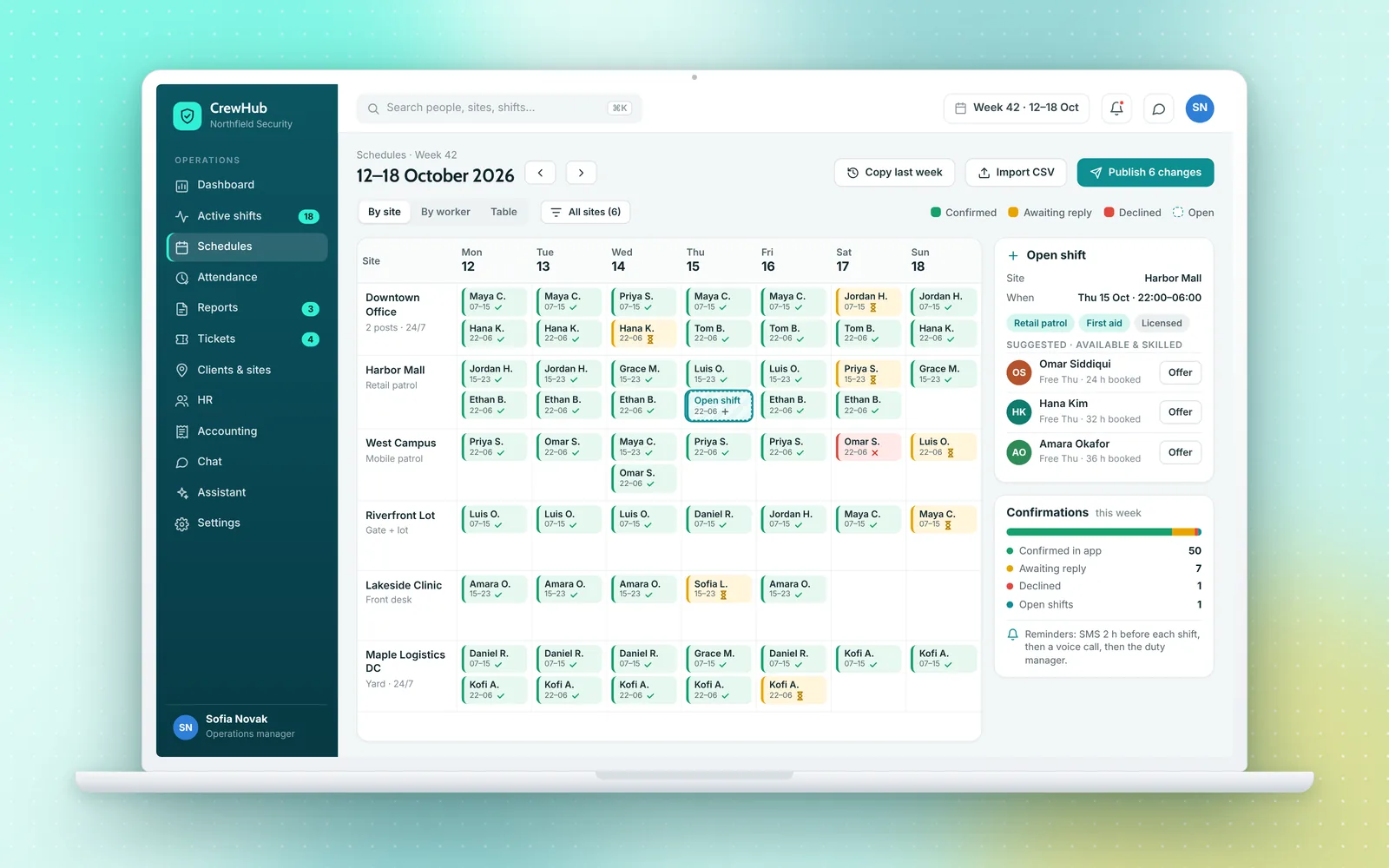
The schedule is a week by site. Each shift shows confirmed, still to reply, or declined, so a gap is visible while there is still time to fill it.
 Opens a larger view
When a shift is open, CrewHub suggests replacements from people who fit, using skills and availability. You still choose. It is a short list, not an automatic move that surprises the team.
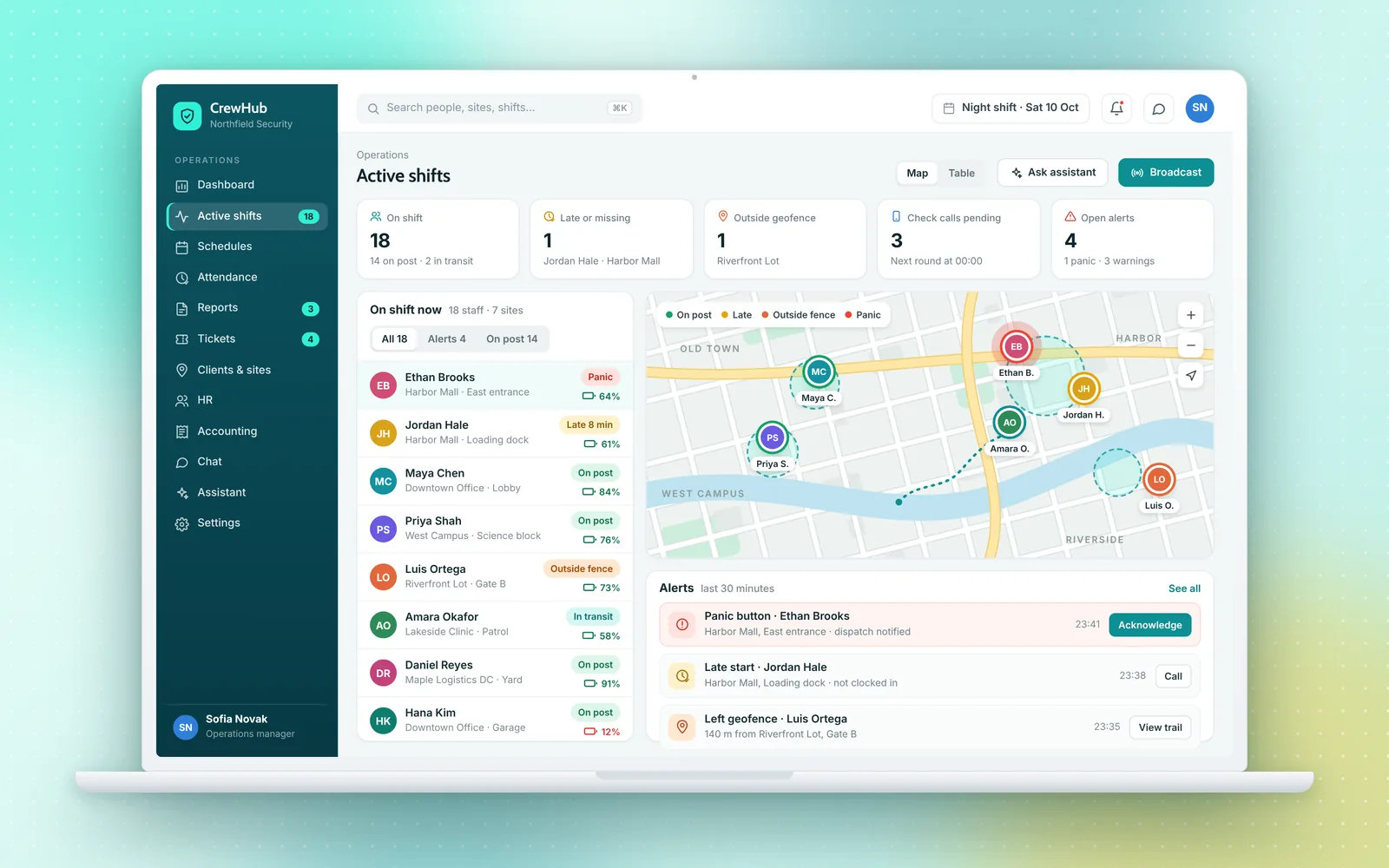
Clock-in uses a GPS geofence. The guard clocks in on the phone, and it counts inside the boundary you set. A tap from somewhere else is not the start. You keep a time and a place for the payroll conversation later.
A late start raises a late-start alert with the other alerts a dispatcher watches, so the client is not your alarm. The live shift dashboard shows who is on post, with site boundaries on the map. An empty post is something you can see.
 Opens a larger view
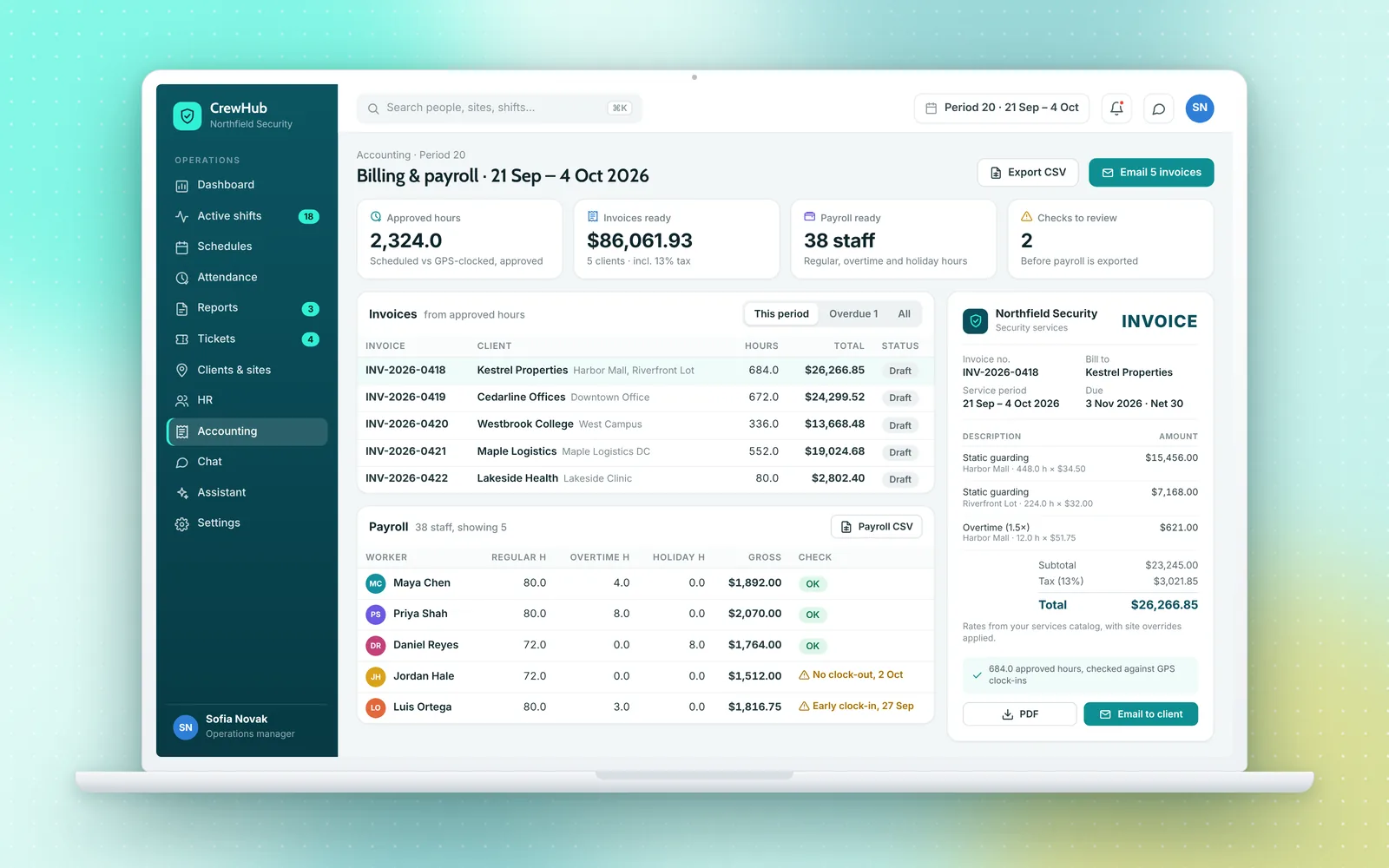
A manager then approves the hours. Payroll and invoicing are built from those approved hours, instead of a timesheet copied into two other places. Odd lines can be checked before the invoice goes out and before pay is run.
 Opens a larger view
Publish, confirm, fill what is open, clock in at the site, catch a late start while you can still act, watch the live dashboard, then pay and bill from approved hours.
There is no public price. We prepare a custom quote for your sites and your team, hosted by us or on your own servers. Demos are on request: a good demo walks a call-out through the scheduler and the dashboard. Someone on your side still has to offer the cover and answer the alert. The Sunday supervisor has to be expected to act.
Questions people ask
What is security guard scheduling software?
It is the system you use to build the week, send each shift to a named guard, and see whether that guard has confirmed. Useful software also shows open shifts, suggests people who can cover, records a clock-in at the site, and warns a manager when a shift starts late.
How do shift confirmations stop a missed shift?
A published roster only means you hoped someone would work. A confirmation means the guard has accepted that shift. If they decline, or if they never answer, you still have time to offer the shift to someone else before the client notices an empty post.
What should we do when a guard calls out at the last minute?
Treat the call-out as an open shift. Take the guard off that post, look at who is qualified and free, and offer the shift to one person at a time. Write the rule down so the night supervisor does the same thing the day supervisor would do.
How much does CrewHub cost, and can we see it first?
Pricing is a custom quote. Demos are on request. Message us on WhatsApp at https://wa.me/923000917812 or email hashmightsolutions@gmail.com and we will walk through scheduling, confirmations, and the live shift dashboard.